Short answer: The best content repurposing tools in 2026 depend on whether you want a generator plus publisher combined (PostTrail), a pure scheduler for posts you already wrote (Buffer, Hootsuite, SocialBee), an X-only thread builder (Typefully), a LinkedIn-only AI writing tool (Taplio), or a custom DIY stack (Zapier plus ChatGPT plus Buffer). This comparison scores 7 content repurposing tools across input, platforms, auto-publish, voice match, and ideal buyer. Full honest breakdown below — including where PostTrail loses.
Content repurposing has split into three sub-categories in 2026. Tools in each category solve different problems, and the worst thing you can do is pick one from the wrong category. This guide compares the seven most-used tools across the three categories, with an honest read on who each is best for — including where PostTrail, the tool I built, is the wrong choice.
I’ve used all seven in production at some point in the last eighteen months. The scorecards below are first-party.
Content repurposing tools: the three categories (pick one before you pick a tool)
Category 1: Schedulers
A scheduler is a queue. You write the post somewhere else, you paste it in, you pick a time. The scheduler publishes. It does not generate content. Category leaders: Buffer, Hootsuite, SocialBee, Typefully (for X).
Pick a scheduler if: you already have a content operation and the writing part is solved.
Category 2: Generators
A generator is an AI writer. You feed it a prompt or a source, it produces drafts. The output goes into your clipboard. Publishing happens somewhere else. Category leaders: Jasper, Copy.ai, Taplio (for LinkedIn), ChatGPT with the right system prompt.
Pick a generator if: you have a scheduler you like and only need help producing copy.
Category 3: Autopublishers (URL-in, posts-out)
An autopublisher combines both. The input is a blog URL (or document). The output is a scheduled calendar of platform-native posts that publish automatically via OAuth. No clipboard step. Category leaders: PostTrail. This is a new category as of 2025-2026.
Pick an autopublisher if: the bottleneck is your own time spent rewriting one idea into seven platform-specific posts.
Most teams assume they need a scheduler. If your content operation looks like “we publish a blog every week and then spend 3 hours reformatting it for LinkedIn and X,” you actually need an autopublisher. The scheduler is solving the wrong problem.
What to look for in a content repurposing tool
Nine criteria, ordered by how much they matter for most teams:
- Does it take a URL as input, or do you still have to paste content?
- Does it publish natively via OAuth, or does it still require copy-paste to the platform?
- How many platforms does it cover, and which ones?
- Does the output sound like you, or generic?
- Can you edit the output before publishing, and how friction-free is the edit?
- What’s the pricing at the tier you’ll actually use?
- How hard is approval / multi-client management for agencies?
- How does it handle your voice — does it learn, or just prompt-engineer?
- What’s the security posture on your social tokens?
Each tool below gets scored against these. No tool wins all nine.
The seven tools, compared
1. PostTrail
Category: Autopublisher.
Input: Blog URL, RSS, or WordPress webhook.
Output: Up to 14 platform-native posts per blog (6 LinkedIn, 8 X at the ceiling; about eight are usually worth posting) across 9 formats. Auto-publishes via OAuth.
Platforms: LinkedIn (company + personal), X. Threads, Bluesky, Instagram on the roadmap.
Voice matching: Voice-extraction pre-pass reads your source writing and constrains the generator to that style. No prompt engineering needed.
Edit experience: Inline composer with bulk actions, one-click regenerate per post.
Pricing: Free for 1 connected site, 2 calendars and 50 publishes per month. Starter $19/month for 3 sites, 25 calendars and 500 publishes. Pro $49/month for 10 sites, 100 calendars and 2,000 publishes. Plans exclude AI model API costs: you connect your own Anthropic API key.
Security: AES-256-GCM at rest, per-account DEKs wrapped in AWS KMS. LinkedIn OIDC with state + nonce. X OAuth 2.0 with PKCE.
Best for: Solo founders, content-led B2B SaaS with lean marketing teams, agencies running 3-20 client blogs.
Where it falls short: Only covers LinkedIn and X in v1. If you need Instagram, Facebook, or TikTok today, PostTrail is not the answer — it will be by Q3 2026, but not yet. No video generation. No community management or inbox tools.
Review: PostTrail is the right pick if the bottleneck in your content operation is time spent reformatting one blog into platform-specific posts. If scheduling is your only problem, it’s overkill. If you need every platform on earth, Buffer or Hootsuite still cover more surface area (though not as deeply).
2. Buffer
Category: Scheduler (with recent AI add-ons).
Input: Blank composer. Recent AI features can rewrite or shorten existing text.
Output: Scheduled posts across all connected platforms.
Platforms: LinkedIn, X, Facebook, Instagram, TikTok, Pinterest, Threads, Bluesky, YouTube Shorts, Mastodon, Google Business. The broadest coverage on the market.
Voice matching: Limited. The recent AI features use standard LLM outputs with light tone adjustments.
Edit experience: Clean, fast composer. The tool the industry was built on.
Pricing: Free for 3 channels and 10 posts per channel. Essentials $6/month per channel ($5 billed yearly). Team $12/month per channel ($10 billed yearly). Pricing scales quickly if you have many channels.
Security: Standard OAuth. Enterprise-grade.
Best for: Teams with a content production pipeline already in place, who need to queue posts across many platforms at a fair price per channel.
Where it falls short: Doesn’t solve the writing bottleneck. You still write each post yourself. The “AI Assistant” add-ons are incremental rather than category-defining. Pricing per channel means a six-channel setup runs $36/month on Essentials and $72/month on Team on monthly billing ($30 and $60 billed yearly).
Review: Buffer is the default scheduler and still the best one for teams whose writing process is handled elsewhere. If you’re writing fourteen platform-specific posts manually and pasting them into Buffer to queue, you don’t need a better scheduler — you need to upgrade to Category 3.
3. Hootsuite
Category: Scheduler (enterprise-focused).
Input: Composer, bulk upload, light AI generation.
Output: Scheduled posts, deep analytics, team workflows.
Platforms: All the majors plus social inbox, monitoring, and listening.
Voice matching: None beyond manual templates.
Edit experience: Powerful but dense. The learning curve is the tradeoff for the feature depth.
Pricing: Standard $99/month, Professional $199/month and Advanced $399/month — per user, on annual billing. Enterprise is custom. Significantly more expensive than Buffer, targeting larger teams.
Security: Enterprise-grade. SOC 2 Type 2, ISO 27001.
Best for: Large teams with compliance requirements, multi-brand social operations, agencies that need listening + publishing + analytics in one vendor.
Where it falls short: Price. Interface complexity. Writing bottleneck unsolved. The AI features are catching up but aren’t differentiators.
Review: Hootsuite is the right pick for enterprise social operations where the tool is one of many, procurement has already signed off, and the writing is handled by a dedicated team. For a lean marketing team or an agency under 50 clients, it’s overbuilt.
4. Typefully
Category: Scheduler + light generator, X-native.
Input: X composer with AI-assist, threading UI, light templates.
Output: Scheduled X threads and tweets. Beta LinkedIn support.
Platforms: X (primary). LinkedIn (beta). That’s it.
Voice matching: AI-assist features help mimic tone but aren’t a voice-extraction model.
Edit experience: The best X threading UI on the market. Period. If you live in X threads, Typefully is a joy.
Pricing: Free tier with limits. Starter $12.50/month. Creator $19/month for 5 connected accounts. Team $39/month.
Security: OAuth to X and LinkedIn. Standard.
Best for: X-first creators, heavy X thread users, founders building in public primarily on X.
Where it falls short: It’s X-centric. LinkedIn support is beta and feature-light. If your audience is on LinkedIn, Typefully is the wrong tool. And it doesn’t repurpose from blog — you still write each thread.
Review: Typefully is the best tool in the world for writing X threads. It’s also a scheduler for those threads, with some light AI help. It is not a content repurposing tool in the autopublisher sense — you write the threads manually. For X power users, still worth it.
5. Taplio
Category: Generator + scheduler, LinkedIn-only.
Input: Prompts, topic suggestions, AI content ideas.
Output: LinkedIn posts generated from prompts, scheduling, analytics.
Platforms: LinkedIn only.
Voice matching: Decent. Uses samples of your past posts to train output tone.
Edit experience: Clean composer, good analytics overlay.
Pricing: Plans from $39/month (LinkedIn only).
Security: Standard LinkedIn OAuth.
Best for: Solo LinkedIn creators, founders who only care about LinkedIn, personal-brand operators building a LinkedIn following.
Where it falls short: LinkedIn-only. No X, no Instagram, no nothing else. If LinkedIn is 50% of your distribution, half your channels are uncovered. Input is prompt-based, not URL-based, so you still have to decide what to write about each time.
Review: Taplio is a specialist tool for LinkedIn-only creators. If your audience lives on LinkedIn and you don’t care about X or other platforms, it’s a reasonable choice. For a multi-platform content operation, you’d end up stacking it with a second tool for X.
6. SocialBee
Category: Scheduler with light AI.
Input: Composer, content categories, recycling queues.
Output: Scheduled posts across platforms, category-based recycling (a differentiator).
Platforms: LinkedIn, X, Facebook, Instagram, Pinterest, TikTok, YouTube, Google Business, Threads, Bluesky.
Voice matching: None beyond templates.
Edit experience: Category-based queues are the standout feature. Useful for teams that want “always have 10 posts in each category in rotation” logic.
Pricing: Bootstrap $29/month. Accelerate $49/month. Pro $99/month.
Security: Standard OAuth.
Best for: Teams that publish evergreen content on a rotation (quotes, tips, promos), small-to-mid agencies, solopreneurs who want category-based queues.
Where it falls short: Doesn’t solve the writing bottleneck. Less polished than Buffer on the composer side. No content generation from source URLs.
Review: SocialBee is Buffer’s more-featureful younger sibling. If the category/rotation logic matches your content model, it’s a good fit. If you’re doing blog-to-social repurposing, you’ll outgrow it quickly.
7. The DIY stack (Zapier + ChatGPT + Buffer)
Category: Autopublisher, self-assembled.
Input: RSS feed of your blog.
Output: Auto-generated posts published via Buffer or a platform API.
Platforms: Whatever you wire up.
Voice matching: As good as your ChatGPT system prompt. Usually generic unless you put real work into the prompt engineering.
Edit experience: Minimal. The point of DIY is to skip the edit. Outputs go live unless you add an approval step (which breaks the “autopublish” promise).
Pricing: Zapier $20-50/month + ChatGPT $20/month + Buffer $6-12/month = ~$46-82/month.
Security: You own the OAuth tokens, which is both good (no third-party middleman) and bad (you’re also responsible for rotation and storage).
Best for: Engineering-friendly solo operators who enjoy tinkering and want full control of the prompt chain.
Where it falls short: The “it works fine” stack looks seductive in a demo and breaks silently in production. Output quality drifts when the system prompt changes, scheduling mistakes double-post, and when something breaks you’re the oncall. In practice, most DIY setups quietly die within 90 days of launch.
Review: The DIY stack is the right pick for roughly 3% of users — those who are both technical enough to maintain it and opinionated enough about the prompt to outperform a dedicated tool. For everyone else, a purpose-built autopublisher ships faster and fails less.
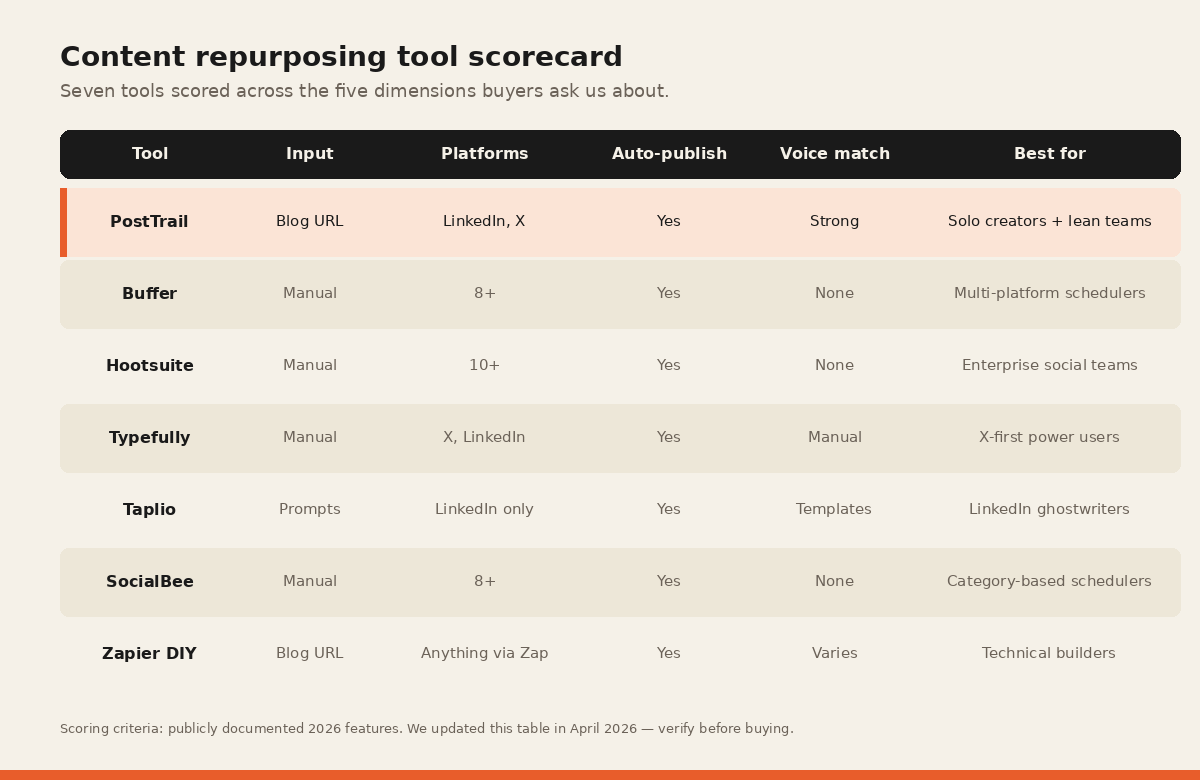
Content repurposing tools: side-by-side scorecard
| Criteria | PostTrail | Buffer | Hootsuite | Typefully | Taplio | SocialBee | DIY stack |
|---|---|---|---|---|---|---|---|
| URL input | Yes | No | No | No | No | No | RSS |
| Auto-publish | Yes | Yes | Yes | Yes | Yes | Yes | Yes |
| Voice-match to source | Strong | Weak | None | Medium | Medium | None | Depends |
| Yes | Yes | Yes | Beta | Yes | Yes | Depends | |
| X/Twitter | Yes | Yes | Yes | Yes | No | Yes | Depends |
| Roadmap | Yes | Yes | No | No | Yes | Depends | |
| Entry price | Free | Free | from $99/user | $12.50 | from $39 | $29 | ~$50 |
| Agency/multi-client | Yes | Yes | Yes | Light | No | Yes | Manual |
| Edit before publish | One-click | Composer | Composer | Composer | Composer | Composer | Manual |
Who each tool is best for
If you’re a solo founder writing 1-2 blogs a month and want those blogs to show up as LinkedIn and X content without spending Sunday on it: PostTrail.
If you’re a social media manager at a B2B SaaS with a content team writing platform-specific posts and you just need to queue and schedule across every platform: Buffer or SocialBee.
If you’re an enterprise social team with compliance, multi-brand, and listening requirements: Hootsuite (or a combination of Hootsuite + an autopublisher for the writing).
If you’re an X-first creator: Typefully.
If you’re a LinkedIn-only personal brand and hate the platform’s native composer: Taplio (and occasionally PostTrail, if you’d also like your blog auto-converted).
If you’re an agency running 10+ clients with a mix of writing and scheduling needs: PostTrail for the content operation layer, plus Buffer or Hootsuite for the cross-platform scheduling layer.
If you’re a hacker who wants to own the stack: DIY. But budget two weeks for setup and a weekend every quarter for maintenance.
How to pick without over-analyzing
Three questions, in order:
- Do you write blog posts? If no, you want a generator (Jasper, Copy.ai, Taplio) more than a repurposing tool.
- Is writing platform-specific versions the thing eating your time? If yes, you want Category 3 (autopublisher). Start with PostTrail’s free tier.
- Do you need coverage beyond LinkedIn and X? If yes, either wait for PostTrail’s Q3 expansion or pair it with a Buffer/SocialBee for the other platforms.
Related reading
- How to repurpose a blog post for social media — the manual method, if you want to do it without a tool first.
- Blog to LinkedIn: the 5-step method — the LinkedIn-specific workflow.
- Blog to X/Twitter thread: the template — the X thread-specific workflow.
- How to promote a blog post in 2026 — the 30-minute distribution system for the first 24 hours.
- Buffer alternatives in 2026 — seven tools compared by which layer of the work each one actually removes.
- Turn your newsletter into LinkedIn and X posts — the 25-minute pass for an issue you have already sent.
- PostTrail vs Buffer, compared directly — the one question a feature table hides: who writes the posts.
- Repurposing posts you wrote years ago — the selection and decay problems no tool on this list solves for you.
- Which tools generate and which extract — why that distinction decides how much of your voice survives, whichever tool you pick.
- Posting frequency once the tool has drafted them — how often to actually publish what a repurposing tool produces, and when to stop.
- What the tools actually save, in minutes — the extract, draft, review and schedule rows priced by hand and with a tool.
- Hootsuite alternatives, priced for a team of two — seven tools read from their own pricing pages, and where the second seat changes the answer.
The one-paste test → Try PostTrail free
Paste your last blog URL. 60 seconds. If the output isn’t publishable, close the tab.
Frequently asked questions
What’s the best content repurposing tool in 2026?
The best content repurposing tool depends on what part of the workflow needs fixing. For blog-to-social conversion with auto-publishing, PostTrail. For general-purpose cross-platform scheduling, Buffer. For X-first thread creation, Typefully. For LinkedIn-only AI writing assistance, Taplio. For enterprise multi-brand operations, Hootsuite. Most teams over-index on scheduling and under-index on the writing bottleneck.
What’s the difference between Buffer and PostTrail?
Buffer is a scheduler: you write the posts, Buffer queues them. PostTrail is an autopublisher — you paste a blog URL, and PostTrail generates platform-native posts and publishes them on the schedule you pick. They solve different halves of the same workflow. Teams often use Buffer for platforms PostTrail doesn’t yet cover (Instagram, TikTok) alongside PostTrail for LinkedIn and X.
Is there a free content repurposing tool?
Yes. PostTrail has a permanent free tier (1 connected site, 2 calendars and 50 publishes per month, no credit card; you bring your own Anthropic API key). Buffer has a free tier with 3 channels and 10 posts per channel. For most small operations, one of these two free tiers is enough to run for months before upgrading.
What’s the best Buffer alternative?
Depends on the gap you’re trying to close. For writing plus scheduling from a source URL, PostTrail. For X-only with a better threading UI, Typefully. For category-based rotation queues, SocialBee. For enterprise social ops, Hootsuite.
What’s the best Hootsuite alternative?
For small teams, Buffer is the most common step down from Hootsuite, and the gap is wider than it looks because the two charge on different units. Hootsuite Standard is $99 a month per user; Buffer Team is $10 a month per channel with unlimited team members (both at annual billing, read from the vendor pricing pages in September 2026). Two people on four channels pay $198 on Hootsuite and $40 on Buffer, about a fifth. For teams that want to solve the writing bottleneck on top of scheduling, PostTrail plus Buffer together cost less than Hootsuite alone.
Do AI content repurposing tools produce good output?
It depends on the tool. Generator-only tools (Jasper, Copy.ai) start from a prompt and tend to sound generic unless heavily trained. Autopublishers like PostTrail start from your actual blog post and constrain the model to your voice, so the output sounds more like you. The general rule: the more the tool uses your source as input, the less AI-generic the output.
Is DIY (Zapier + ChatGPT + Buffer) cheaper than a purpose-built tool?
On paper, sometimes. In practice, rarely, once you factor in maintenance time. Most DIY stacks die within 90 days because nobody owns them. Purpose-built autopublishers cost more in dollars and less in hours.
Written by Darshan Dagli, founder of PostTrail. This comparison was first-party researched across 18 months of production use. If there’s a tool you think belongs in this list, reply on X or LinkedIn and I’ll consider adding it in the next update.
Further reading
- Buffer official site — for the current feature set and pricing of the scheduler used in this comparison.
- Hootsuite official site — for enterprise social ops capabilities cited above.
- Typefully official site — for the X-first thread builder’s feature list.
- Taplio official site — for the LinkedIn-focused AI writing tool.
- SocialBee official site — for the category-queue scheduler.
- Zapier official site — for the DIY automation layer referenced in the stack option.