Short answer: Here is how to turn a blog post into a LinkedIn post that ranks in the feed. Pull one idea from the blog (not a summary), write a scroll-stopping hook under 220 characters, break the body into 2-4 sentence paragraphs with visible line breaks, drop the hashtags, and close with a question or CTA. Aim for 150-300 words total. The full method, with examples, is below.
LinkedIn is the highest-return distribution surface most B2B content teams ignore. The median B2B blog post gets 1,200 views. A single well-built LinkedIn post from the same blog can hit 20,000 impressions in a week. The math is absurd, which is why every role from content writer to CMO is being asked to “also post on LinkedIn.”
This guide gives you the concrete method for doing that conversion well. It’s written for anyone who has a blog post open in one tab and a blank LinkedIn composer open in the other. By the end of it you’ll have a 150-300 word post ready to publish.
Why learn how to turn a blog post into a LinkedIn post?
Before the steps, the rules of the game. LinkedIn’s algorithm in 2026 rewards posts that keep readers on the platform and spark conversation. Specifically:
- Dwell time is the #1 signal. Posts that readers slow down on get pushed to more feeds. A good hook earns the slowdown.
- Early engagement (first 60 minutes) determines reach. A post that gets 10 comments in the first hour outperforms a post that gets 10 comments over a day.
- Comments outweigh likes by roughly 4x. A comment-worthy question at the end matters more than anything you put at the top.
- Posts over 1,300 characters see the “see more” truncation. Most posts should land between 800 and 1,500 characters (roughly 150-300 words).
- Hashtags are neutral-to-negative in 2026. They used to help discovery; now they hurt reach slightly. Skip them.
- External links in the body of a post drop reach. Put any link in the first comment instead.
Every step below is designed to satisfy these signals.
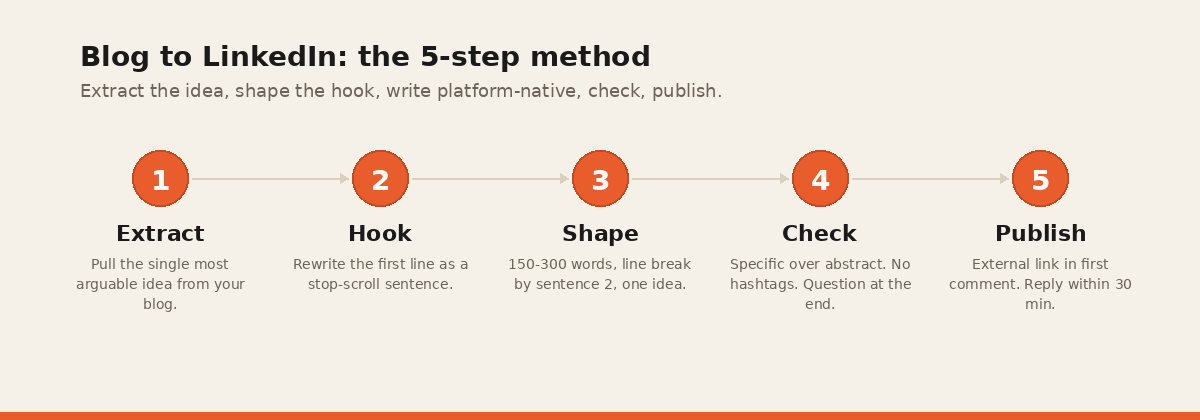
How to turn a blog post into a LinkedIn post: the 5-step method
Step 1 — Pick one idea from the blog (not the whole thing)
The biggest mistake writers make is trying to summarize the whole blog in one LinkedIn post. That produces a generic “I wrote a new piece, here’s what it covers” post that performs worse than the blog link alone.
Instead: pick one sharp idea from the blog. One argument, one number, one story, one framework. The LinkedIn post expands that single idea into a standalone read. The reader doesn’t need to click through to the blog to get the value. The post stands on its own.
A 1,500-word blog typically contains 5-8 ideas sharp enough to become LinkedIn posts. That means one blog can produce six LinkedIn posts across two weeks — each pulling a different thread.
Example. If your blog is about B2B SaaS pricing strategy and has a section arguing for annual-only pricing at the top end, that section can become its own LinkedIn post: the argument, the supporting data, a specific example, and a CTA to read the full piece.
Step 2 — Write the hook (first 220 characters)
The hook is the only part of your post that appears in the feed before the “see more” cutoff. If it doesn’t earn the click, nothing else matters. Three hook formulas that work:
The contrarian hook. State the conventional wisdom, then challenge it.
“Everyone tells B2B SaaS to lead with monthly pricing. That advice kills your AOV.”
The specific number hook. Lead with a concrete statistic.
“47% of our beta users enabled autopublish within 24 hours of their first trail. Here’s what that told us about category-market fit.”
The in-media-res hook. Drop the reader into the middle of the story.
“I canceled our Buffer subscription in December. Here’s what I’m using instead.”
Avoid hooks that start with “I’m excited to share,” “thoughts on,” or “here are 5 tips for.” They’ve been optimized out of the feed.
Step 3 — Structure the body with visible line breaks
LinkedIn readers scan before they read. Dense paragraphs kill dwell time. Break the body into units of 1-3 sentences each, separated by a blank line.
The structure that works for most posts:
- Hook: 1-2 lines
- Context: 2-3 lines explaining why this matters
- The meat: 3-5 short paragraphs, one idea per paragraph
- Takeaway or reframe: 1-2 lines
- CTA or question: 1 line
Each paragraph break is a moment the reader can bail or keep going. White space is a feature.
Example body structure:
Everyone tells B2B SaaS to lead with monthly pricing. That advice kills your AOV.
Monthly pricing trains your prospects to think in small numbers. Your sales team ends up negotiating $29/month instead of $350/year.
The fix is annual-first billing with a monthly toggle. Same plans. Same features. Different default.
Three teams I know did this last quarter. Average AOV went up 34%. Churn went down.
The monthly option stayed. It just stopped being the first thing prospects saw.
What’s your team’s billing default?
Step 4 — Add a specific example, stat, or screenshot
Generic advice dies on LinkedIn. Specifics travel. Every post should include at least one of:
- A first-party statistic from your company, research, or beta.
- A named example (a company, a customer with permission, a public figure).
- A screenshot (dashboard, email, tweet, analytics).
Posts with a named customer example outperform posts without one by roughly 2x engagement. Posts with a screenshot outperform by roughly 3x.
Step 5 — Close with a question, then queue it
The close is where most posts die. “Thoughts?” is not a question. “What’s worked for you?” is. Three close formulas that earn comments:
- The contrast question. “What’s your team’s billing default, monthly or annual?”
- The asymmetric question. “Agree or disagree?” — only works if the post is genuinely divisive.
- The open-ended practical question. “Which of these have you tried?” or “What’s the one you’d add?”
Then queue it. LinkedIn’s algorithm weights early comments heavily, so publish when your audience is active. For most B2B audiences that’s Tuesday through Thursday, 8-10 AM in your primary time zone. Avoid Friday afternoon and weekends. How many of these a week you can sustain is a separate question — we answer it in how often to actually post them.
Common mistakes that tank reach
Five mistakes we see repeatedly from users who paste their first blog into PostTrail and then ask why their manual posts haven’t been performing.
1. Hashtag clutter. #Marketing #SaaS #ContentMarketing in 2020 helped discovery. In 2026 they signal “this is an ad” to the algorithm and drop reach by 10-20%.
2. Posting the blog link in the body. LinkedIn’s ranker penalizes posts with external links in the main body. Put the link in the first comment. Reach will be 40-70% higher.
3. Over-formatting with emojis or bullets. The occasional emoji at the start of a bullet works. A post that’s 60% emojis looks like spam to both humans and the algorithm.
4. Posting more than once a day. Second daily post drops reach on both posts by roughly 30%. If you have two posts ready, spread them over two days.
5. “Thoughts?” as the close. It’s a tell that you want engagement without offering a real question. Nobody answers “thoughts?”
Examples: three blog-to-LinkedIn conversions
Here are three examples of taking the same blog and pulling different LinkedIn posts from it. Source: a hypothetical 1,500-word blog titled “How we doubled our trial-to-paid conversion by removing onboarding.”
Conversion 1: contrarian hook + data.
Your onboarding is losing you revenue.
We doubled trial-to-paid last quarter by doing the opposite of what every SaaS playbook recommends: we removed it.
No product tour. No walkthrough. No empty state with three “let’s get you set up” modals.
Just a single text field and an invisible progress bar.
Conversion went from 8.2% to 17.9% in six weeks.
Here’s why: every forced step is an exit ramp. The playbook tells you to “reduce friction,” then adds eleven modals. The data tells you to take them all out.
Which onboarding step could your product work without?
Conversion 2: story hook.
Three hours into a Monday last March, I deleted our entire onboarding flow.
Not edited. Deleted.
Our trial-to-paid had been flat at 8% for six months. Every fix the growth team proposed added a step to the flow. Every A/B test came back null.
So I took the opposite bet. I shipped a version where the first screen after signup was the product itself — no tour, no empty state, no “let’s show you around.”
Six weeks later we were at 17.9%.
Lesson: friction isn’t always the obvious stuff. Sometimes the whole system you built to “help” is the friction.
What’s one thing you’d delete before you’d add?
Conversion 3: framework.
The three-question onboarding test:
- If a new user landed in your product without any onboarding, could they reach their first value moment?
- If the answer is no, which specific step of onboarding is teaching them what they need?
- If the answer is “none of them really,” your onboarding is a cost, not a feature.
We ran this test last quarter. Our onboarding failed question 2. Every step was teaching UI, not teaching value.
We removed onboarding entirely. Trial-to-paid went from 8.2% to 17.9% in six weeks.
The test still works every quarter.
Each of the three uses a different format (hot take + data, story, framework) and different hook formula, but all come from the same blog. That’s how one blog becomes six LinkedIn posts across two weeks.
The word-count and timing cheat sheet
For copy-paste reference:
- Hook length: under 220 characters (stays above the “see more” fold).
- Total post length: 150-300 words (800-1,500 characters).
- Paragraph length: 1-3 sentences, separated by blank lines.
- Hashtags: zero or one max. Not a feature in 2026.
- External links: first comment, not the body.
- Best posting times (US): Tuesday-Thursday, 8-10 AM local.
- Posting frequency: max 1x/day per account; 3-5x/week for brand pages.
- Reply window: respond to first 10 comments within 60 minutes for maximum distribution.
Automating this workflow
All five steps above can be done by hand in about 25 minutes per post. Six LinkedIn posts from one blog is roughly 2.5 hours of work. PostTrail does the same thing in under a minute: paste the blog URL, get six platform-native LinkedIn posts (across the five hook formulas and the three content formats above), approve and edit in the calendar, auto-publish on schedule.
If you also need X/Twitter posts from the same blog, see the X thread method. If you’re comparing tools before you commit, the 2026 content repurposing tool comparison covers PostTrail, Buffer, Typefully, Hootsuite, and the DIY route. For the broader framework, the full repurposing playbook is the one-stop guide.
Skip the manual pass → Try PostTrail free
Paste one blog URL. Get six LinkedIn posts, ready to schedule, in 60 seconds.
Frequently asked questions
How long should a LinkedIn post be?
Between 150 and 300 words, or roughly 800 to 1,500 characters. Posts under 150 words feel thin. Posts over 1,500 characters hit the “see more” cutoff and reduce dwell time. The middle band is where the algorithm rewards most in 2026.
Should I use hashtags on LinkedIn posts?
No. Hashtags used to help discovery on LinkedIn but were effectively deprecated by 2025. Posts with more than one hashtag now see a measurable reach drop. Zero or one targeted hashtag is the 2026 default.
When is the best time to post on LinkedIn?
For B2B audiences in the US and Europe, Tuesday through Thursday between 8 and 10 AM local time. Avoid Friday afternoons and weekends. Test 2-3 slots within that window for your specific audience. The difference between the best and worst slot for your account can be 30% in impressions.
Can I use the same LinkedIn post on X?
Almost never. LinkedIn and X have different grammars. A 250-word LinkedIn post cross-posted to X either gets truncated or reads as wordy. Rewrite for X using the thread template.
How often should I post on LinkedIn?
For personal profiles: 3-5 times a week, never more than once a day. For company pages: 3-4 times a week, never more than once a day. Posting more dilutes your own reach because the second post of the day drops the first one’s distribution.
Should I put the blog link in the post or in a comment?
In the first comment. LinkedIn’s ranker penalizes external links in the post body, reducing reach by 40-70%. Posting the link as the first comment under your own post preserves reach and still captures clicks.
This method is what PostTrail runs automatically. Written by Darshan Dagli, founder of PostTrail.
Further reading
- LinkedIn’s official Marketing Solutions blog for ongoing updates on feed mechanics and best posting practices from LinkedIn itself.
- LinkedIn engineering blog for technical writing on ranking systems and recommendation models that drive the feed.
- Schema.org HowTo documentation for the structured-data spec used on this post to qualify for how-to rich results.
- Google Search Central — structured data guidelines for Google’s current handling of HowTo markup.
Related reading
- How to repurpose a blog post for social media — the pillar playbook: up to fourteen posts from one article, and how many are actually worth posting.
- Blog to X/Twitter thread — the thread template that works in 2026.
- Best content repurposing tools in 2026 — an honest comparison, including who each tool suits.
- How to promote a blog post in 2026 — the 30-minute distribution system for the first 24 hours.
- Buffer alternatives in 2026 — seven tools compared by which layer of the work each one actually removes.
- Turn your newsletter into LinkedIn and X posts — the 25-minute pass for an issue you have already sent.
- Does Buffer write your posts? — the head-to-head, including where Buffer is the cheaper buy.
- Where the LinkedIn post sits in the full distribution list — the twenty-one steps around it, ranked by what each returns per minute.
- Posts you wrote months ago — how to pick which archived posts are worth extracting, and which to leave alone.
- Does the LinkedIn version still sound like you — why endings are where templating shows up first, and how to check one in a minute.
- What time to post it — weekday mornings in your readers’ time zone, and why the heatmaps don’t transfer.
- Six LinkedIn posts from one essay — plus eight for X, each printed in full and graded.