Short answer: Here is how to repurpose a blog post for social media in 2026. Extract 14 distinct ideas from the source — six for LinkedIn, eight for X — and shape each one to its platform’s native format: hot takes, value threads, frameworks, stories, data posts, carousels, and stat posts. Publish them across two weeks, one format at a time, so the feed stays varied. The full playbook is below.
Repurposing a blog post is the most-attempted and worst-executed step in content marketing. Most teams either post the blog link with a one-liner (low reach), copy-paste the same summary to every platform (also low reach, feels spammy), or give up and move on to the next blog (the worst option of the three).
This playbook is the version that actually works in 2026. It applies whether you’re a social media manager at a B2B SaaS, a content writer trying to get your work seen, an SEO manager chasing content signals, or a founder doing all three jobs at once. The rules are the same. Only the execution speed changes.
What does it mean to repurpose a blog post?
Repurposing means taking one piece of long-form content (a blog post, case study, podcast transcript, or video) and breaking it into multiple shorter pieces designed for the specific shape of each social platform. The key word is designed. A LinkedIn post that’s just the first paragraph of your blog is not repurposing. It’s copy-pasting. Repurposing requires rewriting each idea in the voice and structure of its destination.
Done right, repurposing solves three problems at once. First, it gets more eyes on work you already did. Second, it tests which parts of your blog resonate (a post that gets engagement on LinkedIn points to which section of the blog deserves a follow-up piece). Third, it feeds the algorithm: both LinkedIn and X reward accounts that post consistently, and repurposing is the only way to post consistently without writing ten new things a week.
How many social posts should you get from one blog post?
The honest answer is fourteen. Six for LinkedIn, eight for X. This is the density we landed on after testing five, twelve, and twenty during PostTrail’s beta.
Why fourteen, not five or twenty? Five ran out of content before the week did — by Thursday, creators had nothing left to post. Twenty overlapped by post fifteen. Fourteen is the threshold where the source idea fully supports the output without repeating itself.
Why six on LinkedIn, eight on X? LinkedIn and X are different organisms. LinkedIn rewards lower frequency, longer form — LinkedIn’s own engineering team has published on how feed ranking penalizes volume over relevance. Posting more than once a day drops reach by roughly 30%. Six posts across two weeks is three per week — visible enough to stay in feed memory, sparse enough for each post to get its full distribution window. X is faster. X’s developer platform documentation describes a feed weighted toward recency and reply velocity. Eight posts across two weeks is four per week, which is slightly below serious-X-account cadence, leaving room for replies, quotes, and organic moments.
The ratio isn’t sacred. Agencies running B2B clients often go five LinkedIn, ten X. Creator-economy accounts sometimes go three LinkedIn, twelve X. The ratio is yours. The total stays near fourteen.
The 9 formats that actually perform
Across 240 templates tested with 45 beta users over 11 weeks, only nine formats beat the mean engagement rate with statistical significance. Every other format got dropped. Here are the nine, ordered by how often they apply to a typical blog post.
1. Hot take. One contrarian sentence, one paragraph of support. Wins when your blog has a real point of view that pushes against conventional wisdom. Fails when the blog is neutral (“here are five benefits of X”). Works on both platforms.
2. Value thread. A claim, five to eight supports, a conclusion. Almost always a thread on X; occasionally a long LinkedIn post with visible line breaks. Works when the blog has a clear argument structure.
3. Framework. A named model or numbered process — like the “14-9-1 rule” this post just used. Frameworks are the most-saved format and the most-cited by AI search engines. Name the thing, give it a structure, and the internet will reference it.
4. Story. A first-person anecdote that leads into the blog’s idea. Wins when the blog has a real origin story, customer example, or personal moment. LinkedIn-heavy. Stories on X get buried in feed speed.
5. Data post. One statistic, an interpretation, a takeaway. Wins when the blog cites a specific, memorable number. “47% of beta users enabled autopublish within 24 hours” is a data post. “Most users adopted the feature quickly” is not.
6. Unpopular opinion. Similar to a hot take but phrased as an explicit challenge (“you’re going to disagree but…”). Drives the highest comment-to-like ratio of any format, which signals reach to both algorithms.
7. Carousel. A five-slide LinkedIn carousel: title slide, three content slides, CTA slide. Wins when the blog has structured takeaways that benefit from pacing. LinkedIn-only.
8. Mistakes thread. “I used to X. Here’s what I do now.” Works when the blog argues for a behavior change. The before/after hook is built in.
9. Stat tweet. A single number with no context; the context goes in the reply. X-only. The naked stat stops a thumb.
Every good blog post fires three or four of these nine signals. A weak blog fires one. If you can’t find three formats to pull from your blog, the blog is underwritten — no tool fixes that.
How to repurpose a blog post for social media: the step-by-step method
Here is the workflow, concrete enough to run manually or automate.
Step 1 — Strip the blog down to clean prose
Remove the header, sidebar, related-articles block, and any navigation. Work from the article body only. A clean extract makes the rest of the workflow faster.
Step 2 — Extract the hooks
Read the blog and highlight every sentence that could stand alone. You’re looking for:
- Sentences that state a contrarian position.
- Sentences with a specific number.
- Sentences that reframe something the reader assumes is true.
- Sentences that describe a process in ordered steps.
- Sentences that include a personal anecdote or customer story.
A 1,500-word blog typically yields 18-25 such sentences. That’s your raw material.
Step 3 — Map each hook to a format
Use the 9-format list above. A sentence with a specific number maps to data post or stat tweet. A sentence that reframes an assumption maps to hot take or unpopular opinion. A sentence that describes steps maps to framework or carousel. A sentence with a personal story maps to story or mistakes thread.
Some hooks fit two or three formats. Pick the format that gives the platform’s shape the clearest win — a number with emotional weight goes to stat tweet on X rather than data post on LinkedIn, because the feed format amplifies the punch.
Step 4 — Write each post in platform-native voice
This is the hardest step to automate without losing voice. The rules:
- LinkedIn posts lead with sentence-case hooks, use visible line breaks (one sentence or short paragraph per break), and end with a question or CTA. Avoid hashtags. Target 150-300 words.
- X posts lead with a lowercase hook (optional but common), use line breaks between sentences, and number their threads clearly. First tweet is the hook, not the context. Target 30-280 characters per tweet, 4-12 tweets per thread.
- Carousels get one idea per slide with a maximum of 50 words per slide. Title slide sets the hook, three content slides deliver the meat, CTA slide closes.
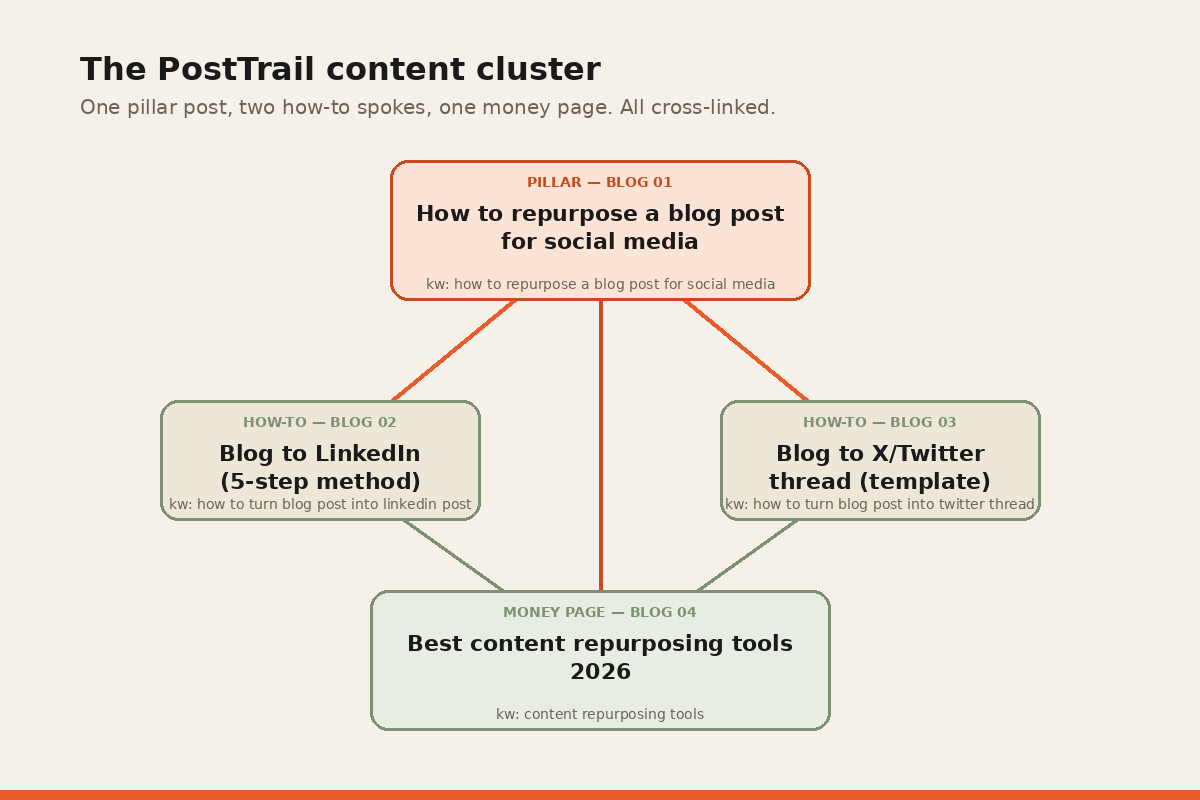
For the specifics of each platform, see our companion posts: the full LinkedIn method and the X/Twitter thread template.
Step 5 — Schedule across two weeks, alternating formats
The most common mistake we see when teams repurpose by hand: they publish fourteen hot takes in a row. Variety compounds attention. If every post for two weeks is the same format, your audience tunes it out regardless of how sharp each one is.
The feed is a variety show, not a lecture. Space the formats so no two posts of the same type land within 48 hours. Alternate LinkedIn and X days if you have bandwidth; batch platforms if you don’t.
Why manual repurposing is a three-hour-per-blog job
Run the steps above honestly and a typical repurposing session takes two to four hours per blog post. Here’s where the hours go:
- 30 minutes: clean-extract + read the blog twice.
- 45 minutes: hook extraction (sentence-by-sentence).
- 30 minutes: map hooks to formats.
- 75 minutes: rewrite each hook in platform-native voice.
- 20 minutes: schedule across the two weeks, assign times, verify variety.
Most content writers don’t do this. They do a compressed version that skips steps 2 and 3, which is why most blog repurposing looks like cross-posting. The shortcut shows.
How to automate repurposing with a tool
Three categories of tools claim to automate this. Honest read of each:
Scheduler-only tools (Buffer, Hootsuite, SproutSocial) automate scheduling. They don’t generate posts. You still write the fourteen posts by hand. These are legacy tools from before AI writing worked. We compared seven of them by what they actually automate — scored on which of the three layers of the work each one removes, not on feature count.
Writer-only tools (Jasper, Copy.ai, ChatGPT) generate posts from a prompt. They don’t publish. You copy-paste into the scheduler. The writing tends to be generic unless you spend significant time on prompt engineering, and the output doesn’t match your voice unless you train it explicitly.
Autopublishing tools (PostTrail) combine both: the input is a blog URL, the output is a scheduled calendar of platform-native posts, and publishing happens via direct OAuth. The full PostTrail workflow: paste URL, get up to 14 posts in 60 seconds, approve/edit, and the calendar auto-publishes.
Which tool you pick depends on how comfortable you are with AI-assisted writing and how much time you have. We’ve written a full honest comparison of the content repurposing tools in 2026 that breaks down when each is the right pick. It includes the ones we compete with.
Repurposing is step one of a bigger routine. For the full first-24-hours playbook — including who to message and which communities to share in — see how to promote a blog post in 2026.
A checklist for how to repurpose a blog post for social media
Before any blog-to-social batch goes live:
- [ ] Fourteen posts drafted (six LinkedIn, eight X)
- [ ] Each post tagged with one of the nine formats
- [ ] No two posts of the same format within 48 hours
- [ ] Each post written in platform-native voice (not cross-posted)
- [ ] Each post under the platform’s ideal length (LinkedIn 150-300 words, X 30-280 chars)
- [ ] Internal link back to the source blog included in at least two posts (usually the value thread and the framework)
- [ ] Hashtags removed from LinkedIn posts
- [ ] Thread numbering verified on X
- [ ] Publish times assigned (LinkedIn: 8-10 AM local; X: 9-11 AM and 2-4 PM local)
- [ ] CTA with UTM parameter on every link
This is the same checklist PostTrail’s generator runs internally. Every output has to pass it before the calendar is shown to the user.
When repurposing fails
A few failure modes worth naming:
The blog has no POV. Neutral how-to blogs (“5 tips for X”) repurpose poorly because there’s no sharp hook to pull. The hot take format fails, the unpopular opinion format fails, and the value thread feels thin.
The blog has no numbers. Data posts and stat tweets need specific numbers. If your blog is all qualitative, you’ll lose two of the nine formats and your output feels less varied.
The blog is too short. Under 800 words and the hook extraction yields only 8-10 sentences, not 18-25. Fourteen posts from that is stretching the material.
The audience mismatch. A blog written for technical buyers repurposes poorly for LinkedIn if your LinkedIn audience is marketers. Repurposing amplifies voice; it doesn’t translate it across audiences.
If any of these apply, fix the blog first. Repurposing is the last step, not the first.
TL;DR for the social media manager rushing to execute
If you need the one-paragraph version for your own notes:
Extract 14 distinct hooks from the blog. Map each to one of nine formats (hot take, value thread, framework, story, data post, unpopular opinion, carousel, mistakes thread, stat tweet). Rewrite each in platform-native voice — LinkedIn gets sentence case and line breaks; X gets lowercase and thread numbers. Schedule across two weeks, no two same-format posts within 48 hours. Six LinkedIn, eight X. Two to four hours by hand, or 60 seconds through PostTrail.
Want the 60-second version? Try PostTrail free →
Paste your blog URL. Get fourteen posts back. No credit card.
Frequently asked questions
What is the best way to repurpose blog content?
The best way to repurpose a blog post is to extract 14 distinct hooks from the source, map each to one of nine proven formats (hot take, value thread, framework, story, data post, unpopular opinion, carousel, mistakes thread, stat tweet), and rewrite each in the native voice of its destination platform. Publish across two weeks with format variety so the feed doesn’t go monotone.
How many social posts can I get from one blog post?
Fourteen is the practical ceiling before posts start repeating themselves. Six for LinkedIn, eight for X, spaced across two weeks. Some teams go heavier on one platform — that’s fine — but fourteen is the ceiling, not the yield: counted by hand on our own essays, the honest number worth posting from a blog under 2,500 words is about eight.
How long does it take to repurpose a blog post manually?
Two to four hours for a thorough job. Thirty minutes to extract, forty-five minutes to map hooks to formats, seventy-five minutes to rewrite, twenty minutes to schedule. Teams that compress it into thirty minutes are usually cross-posting, not repurposing.
What’s the difference between repurposing and cross-posting?
Repurposing rewrites each idea in the voice and structure of its destination platform. Cross-posting publishes the same copy to every platform. Cross-posting is fast and underperforms everywhere. Repurposing is slower and outperforms on every platform that respects its own grammar.
Do I need a tool to repurpose content?
No — you can do it manually with the method above. But if you publish more than one blog a month, a tool pays for itself within the first three blogs. See our tool comparison for what to look for.
How often should the same blog post be reused for social?
A single batch — up to 14 posts at the ceiling, about eight in practice — covers two weeks. After that, a strong evergreen blog can yield another 5-7 posts in a “volume 2” batch 6-8 weeks later, with fresh hooks pulled from the long tail of the post. Three-peating the same content within 90 days gets diminishing returns.
Written by Darshan Dagli, founder of PostTrail. For the full product workflow see the 60-second tour.
Further reading
- Google Search Central — topic clusters and internal linking for the SEO backbone of the cluster architecture used in this post.
- Schema.org Article documentation for the structured-data spec that powers rich results on posts like this one.
- LinkedIn engineering blog for first-party writing on how LinkedIn’s feed ranks content.
- X developer platform for the current state of X’s API and ranking signals.
Related reading
- Turn any blog post into a LinkedIn post — the 5-step method, with worked examples.
- Blog to X/Twitter thread — the thread template that works in 2026.
- Best content repurposing tools in 2026 — an honest comparison, including who each tool suits.
- How to promote a blog post in 2026 — the 30-minute distribution system for the first 24 hours.
- Buffer alternatives in 2026 — seven tools compared by which layer of the work each one actually removes.
- Turn your newsletter into LinkedIn and X posts — the 25-minute pass for an issue you have already sent.
- Which tool actually writes the posts — PostTrail and Buffer head to head, with current pricing for both.
- A distribution checklist ranked by return — twenty-one steps, each priced in minutes, including the seven that come before the first share.
- The archive version of this pass — how to work a back catalogue: sort by argument, run a decay check, and know when to leave a post alone.
- Whether the output still sounds like you — the three places voice leaks when a post becomes a social post, and the swap test that finds them.
- A posting cadence you can keep — why the number of posts a week is set by how much you write, not by the algorithm, with each rung priced in essays.
- The ROI of doing this at all — how long one essay takes to turn into posts, and which part of that no tool shortens.
- The tools, priced for a small team — what seven schedulers cost two people with four accounts.
- Choosing your posting slots — two slots, six weeks, and a stopping rule decided in advance.
- A content repurposing example, graded post by post — one essay, fourteen posts, and the nine worth sending.